Evaluating Presentation Template - Aspire for Professional Use
Selecting the right visual framework is a critical step in professional communication. For individuals and organizations seeking a versatile design solution, Presentation Template - Aspire offers a structured approach to slide creation. This resource is designed to serve multiple functions, ranging from corporate reporting to creative portfolios. When evaluating this template, it is essential to look beyond the aesthetic preview and understand the technical specifications, practical applications, and inherent limitations. A thorough assessment ensures that the tool aligns with specific project requirements and workflow capabilities before integration into a production environment.
Core Functionality and Technical Specifications
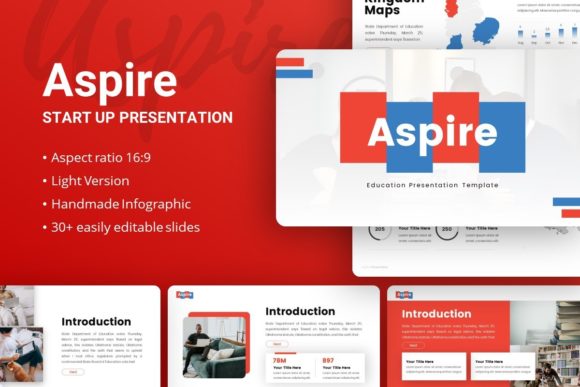
Presentation Template - Aspire is fundamentally a PowerPoint-based design system comprising 35 distinct slides per template variation. Unlike simple collections of static backgrounds, this asset is built upon Master Slides. This architectural choice is significant for users who require efficiency. Master Slides allow for global changes across multiple layouts, ensuring consistency in fonts, colors, and logo placement without the need to format individual slides manually. For teams managing large decks or recurring reports, this feature reduces administrative overhead and minimizes formatting errors.
The template includes handcrafted infographics and pixel-perfect illustrations that are fully vector-based. Because these elements are vectors rather than raster images, they remain crisp at any zoom level or display resolution. More importantly, they are editable within the native PowerPoint environment. Users can modify colors, adjust shapes, and resize graphics without external software like Adobe Illustrator. The inclusion of drag-and-drop picture placeholders further streamlines the content population process, allowing non-designers to insert media while maintaining the intended layout proportions.
Versatility Across Different Sectors
The primary value proposition of Presentation Template - Aspire lies in its adaptability. It is engineered to support diverse use cases, making it a potential candidate for various stakeholders:
- Creative Agencies and Portfolios: The clean aesthetics and image-centric layouts support visual storytelling, allowing designers and photographers to showcase work without the slide design competing with the content.
- Corporate and Business Profiles: Structured layouts for data visualization and team introductions facilitate standard business communications, such as quarterly reviews or company overviews.
- Startups and Pitch Decks: Specific slides tailored for problem-solution narratives and market analysis provide a foundational structure for investor presentations.
- Education and Training: As suggested by the "Aspire Education" variant, the template supports instructional design with layouts suitable for lesson plans, workshops, and academic lectures.
This breadth makes the template a practical choice for organizations where a single brand asset must serve multiple departments. However, versatility often requires customization. Users should assess whether the generic nature of the layouts provides enough specific structure for niche industries or if significant modification will be required to meet specialized standards.
Benefits and Operational Advantages
Adopting Presentation Template - Aspire offers several tangible benefits for workflow optimization. The most immediate advantage is time efficiency. Creating 35 unique, professionally designed slides from scratch requires dozens of hours of design labor. This template compresses that timeline significantly, allowing teams to focus on narrative development and data accuracy rather than alignment and typography.
Furthermore, the included documentation file serves as a critical operational asset. Comprehensive documentation reduces the learning curve associated with complex master slide structures. It guides users on how to manipulate vector icons, replace placeholders, and manage color themes. For organizations with varying levels of design literacy, this support material helps maintain brand integrity even when junior staff members are tasked with deck creation. The provision of vector icon sets also eliminates the need to source or purchase additional graphical assets, keeping the design ecosystem self-contained.
Tradeoffs and Critical Considerations
While the template offers substantial utility, prospective users must weigh specific tradeoffs. A primary consideration is the licensing and asset inclusion policy. All images shown in the demo preview are for demonstration purposes only and are not included in the downloadable files. Users must budget time and resources for sourcing high-quality stock photography or producing original imagery. Relying on low-resolution or mismatched placeholder images can undermine the professional quality of the final deliverable.
Additionally, the reliance on PowerPoint as the sole platform presents compatibility considerations. While .PPTX is a universal standard, complex master slides and vector manipulations can sometimes behave unpredictably when opened in alternative software like Keynote, Google Slides, or LibreOffice. Organizations that operate in mixed-software environments should test the template thoroughly before committing to ensure that editability is preserved across their tech stack.
There is also the factor of ubiquity. Popular templates run the risk of overuse. If competitors or peers utilize the same asset, presentations may begin to look generic. Mitigating this requires intentional customization—altering color palettes, adjusting typography, and rearranging layout components to create a distinct visual identity that diverges from the default preview.
Situational Fit: When to Choose Aspire
Presentation Template - Aspire is likely a strong fit for users who prioritize structural flexibility and native PowerPoint editability. It is particularly well-suited for internal teams that lack dedicated graphic designers but need to produce polished, consistent collateral regularly. The master slide architecture makes it ideal for organizations establishing or refreshing brand guidelines, as it enforces visual rules systematically.
It is also appropriate for freelancers and agencies managing multiple clients. The ability to quickly re-theme the template allows for rapid turnaround times without sacrificing quality. For educational institutions, the specific education-focused variation provides a cohesive look for course materials that can be standardized across different instructors or departments.
When to Evaluate Alternatives
Despite its strengths, this template may not be the optimal solution for every scenario. Users requiring highly specialized data visualization, such as complex financial modeling or interactive dashboards, may find the general-purpose infographics insufficient. In such cases, industry-specific templates or custom design services might offer better functional depth.
Furthermore, teams that have migrated entirely to cloud-native collaboration tools like Figma or Canva may find a traditional .PPTX file restrictive. While Aspire is editable, it does not offer the real-time multi-user collaboration features inherent to modern web-based design platforms. If simultaneous editing and browser-based accessibility are top priorities, alternatives built natively for those ecosystems should be considered.
Finally, projects with extremely tight deadlines and zero tolerance for learning curves might require simpler solutions. While Aspire is documented, mastering the master slide relationships takes an initial investment of time. For a one-off presentation needed within hours, a simpler, less robust template might be more pragmatic.
Making the Final Decision
Evaluating Presentation Template - Aspire requires balancing immediate aesthetic appeal against long-term usability. Stakeholders should review the documentation first to verify that the technical features match their team's skill level. Testing the master slide functionality with actual content, rather than relying on the preview, provides the most accurate predictor of success. By understanding both the capabilities and the constraints of this asset, decision-makers can determine if it serves as a sustainable foundation for their communication needs or if a different solution better addresses their specific operational context.