Aktivatum Business Presentation Template Guide
Creating a compelling visual narrative is often the difference between a pitch that lands and one that falls flat. The Aktivatum Business Presentation Template serves as a sophisticated foundation for professionals who need to communicate complex ideas with clarity and style. Rather than starting from a blank canvas, this template provides a structured yet flexible framework designed to elevate your content. It bridges the gap between rigid corporate reporting and dynamic creative storytelling, making it an essential asset for anyone looking to present their work or business strategy effectively.
Versatile Applications Across Industries
One of the strongest attributes of the Aktivatum Business Presentation Template is its adaptability. While many templates are pigeonholed into specific niches, this collection is engineered for cross-functional use. For creative agencies and design studios, the layout supports high-impact imagery and minimalist typography that lets portfolio pieces breathe. Conversely, corporate entities and startups can leverage the same master slides to present financial data, organizational charts, and strategic roadmaps without losing visual cohesion.
The utility extends beyond traditional business boundaries. Photographers can utilize the grid systems to create immersive digital lookbooks, while educators and trainers can transform dense information into digestible visual lessons. Freelancers building personal brands will find the structure particularly useful for showcasing case studies and testimonials in a format that feels professional yet personal. This versatility ensures that the template remains relevant regardless of how your career or business evolves over time.
Technical Features That Streamline Workflow
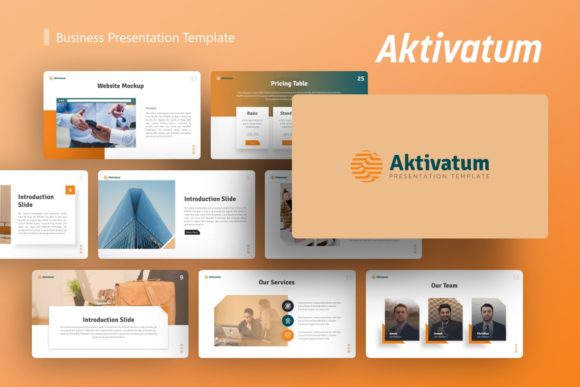
Efficiency is just as important as aesthetics when preparing for a deadline. The Aktivatum Business Presentation Template includes 36 unique slides for each variation, providing ample options without overwhelming the user. Crucially, these slides are based on Master Slides within PowerPoint. This architectural choice means you can adjust global elements like fonts, colors, and logo placement across multiple slides simultaneously, rather than formatting them individually. This feature alone saves hours of tedious editing and ensures consistency throughout the deck.
The template also features handcrafted infographics built directly in PowerPoint. Unlike static images imported from external software, these graphics are fully editable vector shapes. You can modify data points, change color schemes to match your brand guidelines, and resize elements without experiencing pixelation. Combined with drag-and-drop picture placeholders, the technical barrier to entry is remarkably low. You do not need advanced graphic design skills to achieve a polished, pixel-perfect result; you simply need to understand your content and how to place it effectively.
Strategic Customization for Maximum Impact
Owning a powerful tool is only the first step; knowing how to wield it defines your success. When adapting the Aktivatum Business Presentation Template, start by auditing your content hierarchy. Not every slide needs to be used, and not every element needs to be filled. White space is an active design component that guides the viewer’s eye and prevents cognitive overload. Select the specific layouts that best support your narrative arc, whether that is a problem-solution flow for a startup pitch or a chronological showcase for a portfolio.
Color psychology plays a significant role in presentation effectiveness. While the template comes with predefined palettes, customizing these to align with your brand identity or the emotional tone of your message is vital. A fintech startup might opt for deep blues and clean whites to convey trust and stability, whereas a lifestyle brand might choose warm earth tones to evoke authenticity. Because the graphics are resizable and editable, you can maintain visual harmony even as you shift the color spectrum entirely.
Adapting Content for Diverse Audiences
The same core message often requires different packaging depending on who is listening. If you are using this template for an investor pitch deck, focus on the data-driven infographic slides and clear value proposition layouts. Investors scan for metrics, market size, and traction; use the template’s structured grids to make these numbers pop. Reduce decorative elements and prioritize readability and logical flow.
In contrast, when presenting a creative portfolio or photography collection, invert that priority. Use the full-bleed image slides and minimal text overlays to create an emotional connection. Let the visuals dominate the screen, using text only as subtle captions or context markers. For internal corporate training or educational workshops, balance is key. Alternate between text-heavy explanation slides and visual summary slides to maintain engagement and reinforce learning outcomes. The Aktivatum Business Presentation Template facilitates these shifts in tone through its diverse slide library, allowing you to curate a bespoke experience for every audience.
Maintaining Professional Standards and Clarity
A common pitfall when using comprehensive templates is over-designing. Just because a slide has ten animated elements does not mean you should use all of them. Effective communication requires restraint. When working with the Aktivatum Business Presentation Template, treat the provided designs as a maximum capacity, not a minimum requirement. Your goal is to enhance understanding, not to demonstrate the template's capabilities.
Consistency builds credibility. Ensure that your font sizes, heading styles, and spacing remain uniform across the entire deck. The Master Slide functionality makes this easier, but manual vigilance is still necessary, especially when copying and pasting content from external sources. Always check alignment and margins. Misaligned elements subconsciously signal a lack of attention to detail, which can undermine the authority of your spoken message. Utilize the included documentation file to understand the grid system and layout logic intended by the designers; respecting this underlying structure keeps your modifications looking intentional rather than accidental.
Practical Considerations for File Management
Before diving into customization, familiarize yourself with the included files. The package contains the .PPTX file, a documentation guide, and a set of vector icons. Note that demo images are for preview purposes only and are not included in the download. This is standard practice, but it requires you to have your own high-quality assets ready before you begin designing. Sourcing generic stock photos to fill placeholders often dilutes the impact of a premium template. Invest time in selecting authentic imagery that genuinely represents your project or brand.
File organization matters for long-term usability. Save your customized version with a clear naming convention that includes the date and version number. Keep a pristine copy of the original template untouched as a reference point. If you create a particularly effective custom layout during your project, save it back to your master file for future use. Over time, you can build a personalized library of slides derived from Aktivatum that perfectly suits your recurring presentation needs, turning a one-time purchase into a sustainable design system.
Elevating Your Visual Communication
Ultimately, the value of the Aktivatum Business Presentation Template lies in its ability to translate abstract ideas into tangible visual formats. It removes the friction of design so you can focus on the substance of your message. Whether you are launching a startup, rebranding an agency, or documenting a personal journey, the template provides the scaffolding needed to build something meaningful.
Approach this tool with a mindset of purposeful adaptation. Experiment with different slide combinations, test various typographic treatments, and iterate based on feedback. The most successful presentations are those where the design feels invisible, seamlessly supporting the speaker and engaging the audience. By leveraging the robust features and versatile layouts of this template, you position yourself to deliver clearer, more persuasive, and aesthetically superior presentations that resonate with modern audiences.