Evaluating Presentation Template - Figure for Fashion and Creative Business Needs
Selecting the right visual framework for a pitch deck, portfolio, or corporate profile often dictates how effectively an audience receives your message. For professionals in creative agencies, fashion, startups, and personal branding, the Presentation Template - Figure offers a specialized solution designed to bridge the gap between high-end aesthetic appeal and functional business communication. Unlike generic corporate themes that prioritize data density over design, this template focuses on visual hierarchy and editorial-style layouts. Understanding its specific features, strengths, and limitations is essential for determining whether it aligns with your current project requirements or if an alternative approach would be more effective.
Defining the Scope and Core Features
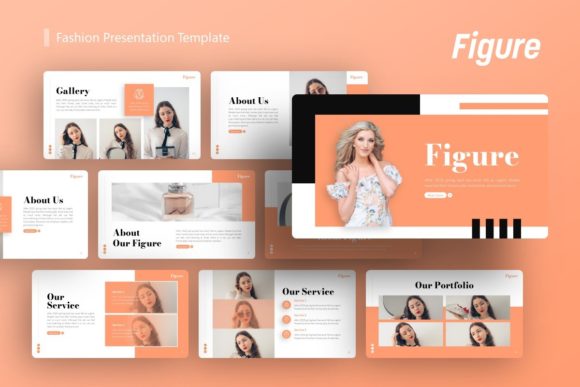
The Presentation Template - Figure is structured as a comprehensive PowerPoint (.PPTX) resource containing 36 unique slides. This volume is significant because it provides enough variety to construct a complete narrative without forcing users to duplicate layouts or create custom slides from scratch. The template is built upon Master Slides, a technical distinction that matters for long-term usability. Master Slide architecture ensures that global changes—such as updating a logo, changing a color palette, or adjusting font families—propagate instantly across the entire deck. This reduces maintenance time significantly compared to templates where formatting must be adjusted slide-by-slide.
A defining characteristic of this resource is its handcrafted infographic integration. Many presentation assets rely on stock vector packs that look disjointed from the overall theme. In contrast, Figure includes pixel-perfect illustrations designed specifically to match the template’s typography and spacing. These graphics are fully resizable and editable, allowing users to adapt complex data visualizations without losing visual fidelity. Additionally, the inclusion of drag-and-drop picture placeholders streamlines the workflow for photography-heavy presentations, making it particularly relevant for fashion portfolios and creative agency profiles where imagery drives the narrative.
Comparing Editorial Styles Versus Traditional Corporate Formats
When evaluating Figure against standard business templates, the primary differentiator is the design philosophy. Traditional corporate decks often utilize rigid grids, heavy text blocks, and conservative color schemes optimized for reading rather than viewing. Figure adopts an editorial approach, utilizing negative space, asymmetric layouts, and bold typography similar to fashion magazines or art books. This makes it superior for contexts where brand perception and visual storytelling are paramount, such as introducing a new fashion line or showcasing a creative portfolio.
However, this stylistic choice involves tradeoffs. If your primary objective is to present dense financial tables, regulatory compliance data, or technical engineering specifications, the open layouts of Figure may require significant modification to accommodate high information density. Users accustomed to standard bullet-point hierarchies may find the learning curve steeper when adapting content to fit an editorial grid. In these scenarios, a hybrid approach or a more traditional data-centric template might serve as a better baseline, reserving Figure for executive summaries, brand introductions, or marketing-focused sections of a larger deck.
Assessing Fit for Specific Professional Use Cases
The versatility of Presentation Template - Figure allows it to serve multiple distinct audiences, though its effectiveness varies by context. For Creative Agencies and Portfolios, the template is often an ideal fit. The emphasis on large-format imagery and minimalist text supports case studies and visual resumes without competing with the work being displayed. The 36-slide count covers essential portfolio structures, including team introductions, service breakdowns, and project showcases.
For Startups and Pitch Decks, the template excels in early-stage fundraising where vision and team credibility outweigh detailed metrics. The handcrafted infographics help simplify complex business models into digestible visuals, which is crucial for investor engagement. However, later-stage startups requiring extensive appendix slides or granular market analysis may need to supplement Figure with additional data-focused slides. Similarly, for Fashion and Retail Businesses, the template’s inherent aesthetic aligns naturally with industry standards, reducing the friction between brand identity and presentation format. Conversely, highly regulated industries like healthcare or finance may find the template too stylized for formal reporting, though it could still be valuable for internal culture decks or public-facing marketing materials.
Technical Considerations and Customization Workflow
Beyond aesthetics, practical decision-making requires understanding the technical ecosystem of the template. The included documentation file serves as a critical resource, guiding users through the Master Slide structure and icon usage. Professionals evaluating this asset should verify their software compatibility; while .PPTX files are generally universal, certain advanced animations or font renderings can vary between Microsoft PowerPoint, Keynote, and Google Slides. Since the template relies on specific typography to maintain its "pixel-perfect" appearance, users must be prepared to install custom fonts or select appropriate system alternatives that preserve the intended visual weight.
The editability of graphic elements is another key evaluation metric. Because the infographics are native vector shapes rather than flattened images, they remain crisp at any resolution. This is vital for multi-format delivery, where a deck might be projected on a 4K screen, printed as a handout, or exported as a PDF. Users should test the resizing behavior of these elements early in the customization process to ensure they integrate seamlessly with their own branded assets. The drag-and-drop image placeholders further enhance efficiency, but they also impose a fixed aspect ratio. Evaluators should check whether their existing photo library matches these ratios or if cropping will be necessary to avoid awkward whitespace.
Licensing, Assets, and Realistic Expectations
A common point of confusion when acquiring digital presentation assets is the distinction between the template structure and the demo content. It is important to note that all images shown in the Figure preview are for demonstration purposes only and are not included in the downloadable files. This is standard industry practice due to licensing restrictions, but it impacts project timelines. Buyers must budget time and resources for sourcing their own high-quality photography that matches the template’s sophisticated tone. Using low-resolution or stylistically mismatched stock photos can undermine the premium feel that Figure is designed to convey.
Furthermore, while the template includes vector icons, organizations with established brand guidelines may need to replace these with proprietary iconography to maintain consistency. The ease of this replacement depends on the icon style and format provided. Evaluators should inspect the icon set during the preview phase to determine if it aligns with their brand voice or if a complete swap is necessary. Understanding these boundaries helps prevent scope creep and ensures the template serves as a time-saving foundation rather than a redesign project.
Making the Final Selection Decision
Choosing Presentation Template - Figure ultimately comes down to balancing visual impact with functional requirements. It represents a strong option for users who prioritize brand aesthetics, storytelling, and modern design over traditional data presentation. Its strengths lie in its master slide architecture, cohesive infographic system, and suitability for creative, fashion, and startup contexts. The 36-slide library provides ample flexibility for most standard narratives, and the editable nature of the assets supports long-term reuse across multiple campaigns.
However, it is not a universal solution. Teams heavily reliant on tabular data, those operating within strict conservative brand guidelines, or users lacking access to high-quality photography may find better utility elsewhere. When comparing options, consider the end goal of the presentation. If the objective is to inspire, showcase beauty, or tell a compelling brand story, Figure is likely a high-value investment. If the goal is purely informational or compliance-driven, the editorial focus may introduce unnecessary friction. By weighing these factors against your specific content strategy and technical capabilities, you can make an informed decision that supports both your immediate presentation needs and your broader professional objectives.