Summer Doodle Vector 02: Creative Design Applications
Capturing the essence of summer in digital design requires a balance between vibrant energy and clean aesthetics. Summer Doodle Vector 02 provides a comprehensive library of hand-drawn style elements that bridge this gap, offering creators a versatile toolkit for seasonal projects. Unlike raster images that degrade when manipulated, these vector illustrations maintain crisp edges and perfect clarity regardless of scale. This technical advantage allows designers to move fluidly between small social media icons and large-format print materials without compromising visual integrity.
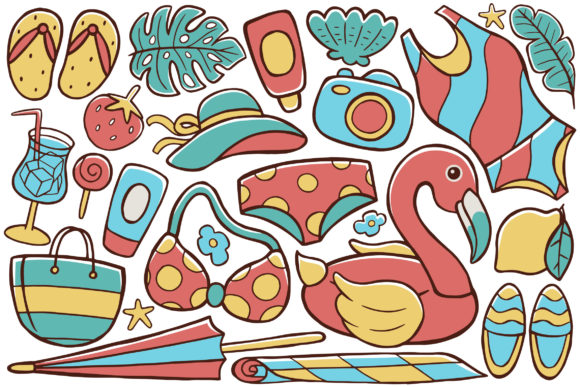
The collection features 100 unique illustrations rendered in a flat design style, making them exceptionally adaptable for modern web and print layouts. Whether you are building a landing page for a travel agency or designing educational worksheets for a summer camp, the consistent line weight and playful aesthetic ensure a cohesive look across all touchpoints. The true value lies not just in the assets themselves, but in the flexibility they offer to customize colors, compositions, and contexts to match specific brand identities.
Leveraging Vector Flexibility for Brand Consistency
One of the primary challenges in seasonal marketing is integrating thematic elements without breaking established brand guidelines. Because Summer Doodle Vector 02 is delivered in editable AI, EPS, and PDF formats, you can adjust every color value to align with your corporate palette. A beach ball illustration does not have to remain its default primary colors; it can be recolored to pastel tones for a wellness brand or shifted to high-contrast neons for a music festival promotion.
This level of customization extends beyond simple recoloring. Vector paths allow you to modify shapes, combine elements, or isolate specific components within a doodle. If a particular illustration contains multiple items but you only need the sunglasses, you can easily ungroup the layers and extract exactly what is necessary. This modular approach prevents designs from looking cluttered and ensures that every visual element serves a deliberate purpose in your layout.
Digital Marketing and Social Media Applications
Social media feeds move quickly, and static designs often fail to capture attention. The playful nature of these doodles introduces a human touch to digital content that feels organic rather than manufactured. For Instagram carousels or Pinterest pins, use the PNG files with transparent backgrounds to overlay summer motifs onto photography. This creates a mixed-media effect that performs well algorithmically by encouraging longer dwell times.
- Story Highlights: Create custom cover icons using isolated doodle elements to organize saved stories into categories like "Events," "Tips," or "Shop."
- Engagement Posts: Use illustrations as visual prompts for questions or polls, such as pointing arrows directing users to comment sections or link stickers.
- Ad Creatives: Incorporate flat design elements into performance ads to soften sales messaging and increase click-through rates through friendly visuals.
- Email Headers: Utilize the high-resolution JPG or PNG exports to build responsive email banners that load quickly on mobile devices.
When designing for screens, remember that the 4000 x 6000 pixel dimensions provide ample resolution for retina displays while remaining lightweight enough for fast loading speeds. Always export web assets in RGB color mode and optimize file sizes to maintain site performance metrics.
Print Design and Physical Product Integration
The transition from screen to physical media requires careful attention to detail, particularly regarding resolution and color space. Summer Doodle Vector 02 supports professional print workflows through its native Adobe Illustrator compatibility. When preparing files for merchandise, packaging, or editorial spreads, working directly in the AI or EPS format ensures that typography and lines remain sharp at any physical dimension.
For entrepreneurs and small business owners, this asset pack opens doors to product development without hiring a dedicated illustrator. Consider applying these patterns to tote bags, sticker sheets, or greeting cards. The flat design style translates exceptionally well to screen printing and vinyl cutting because it avoids complex gradients that can be difficult or expensive to reproduce physically. By arranging the doodles into seamless patterns or border frames, you can create custom wrapping paper or textile designs that feel bespoke and commercially viable.
Educational and Informational Content Creation
Educators, bloggers, and instructional designers benefit significantly from the approachable aesthetic of hand-drawn vectors. Complex information becomes more digestible when paired with friendly visuals. Use these illustrations to break up dense text in blog posts, guide readers through infographics, or add visual interest to presentation slides. The key is to use the doodles as functional signposts rather than mere decoration.
- Visual Hierarchy: Place larger doodles near headlines to draw the eye, and smaller elements next to bullet points to maintain rhythm.
- Concept Association: Pair specific icons with recurring topics to help audiences build mental associations and improve information retention.
- Whitespace Management: Use illustrations to fill negative space constructively, guiding the viewer’s gaze through the content flow without adding cognitive load.
- Tone Setting: Adjust the density of doodles to control the perceived difficulty of the material; sparse placement suggests professionalism, while dense clustering implies playfulness.
Technical Workflow and File Management
Maximizing the utility of Summer Doodle Vector 02 requires an organized workflow. With 100 individual illustrations, establishing a systematic naming convention and folder structure early on saves significant time during production. Keep your master AI files separate from exported web assets to preserve editability. When sharing files with team members or clients, include both the editable source files and flattened PNG/JPG versions to accommodate varying software access levels.
Understanding the difference between the provided file types ensures optimal output for each medium. Use AI and EPS files for any project requiring future edits or scaling. Choose PDF for sharing proofs or sending to commercial printers who may not have Adobe Illustrator installed. Rely on PNG files for digital overlays where transparency is essential, and reserve JPG files for final web delivery or background textures where transparency is unnecessary. The included 4000 x 6000 pixel dimensions serve as a safe baseline, but the vector nature means you are never truly limited by pixel counts.
Maintaining Originality in Template-Based Design
While pre-made assets accelerate production, there is a risk of creating generic-looking work. To keep your designs distinctive, treat Summer Doodle Vector 02 as raw material rather than finished art. Combine multiple elements to create new composite illustrations, alter stroke widths to match your existing visual language, or integrate the doodles with custom photography and typography. The goal is to make the assets feel like they were drawn specifically for your project.
Context matters immensely. A sun icon used in isolation reads differently than the same icon incorporated into a complex pattern or paired with handwritten copy. Experiment with scale, rotation, and opacity to discover unexpected applications. Sometimes reducing a doodle to 20% opacity creates a subtle texture that enhances readability without competing with foreground content. Other times, enlarging an element to bleed off the edge of the canvas creates dynamic tension and modern framing.
Ultimately, successful design solves problems. These vector illustrations should serve your communication objectives first and aesthetic preferences second. By focusing on how each element improves user experience, clarifies messaging, or strengthens brand recognition, you transform a collection of cute drawings into a strategic design resource. The ease of editing and high-quality output provided by this pack removes technical barriers, allowing you to focus entirely on creative problem-solving and effective visual storytelling.