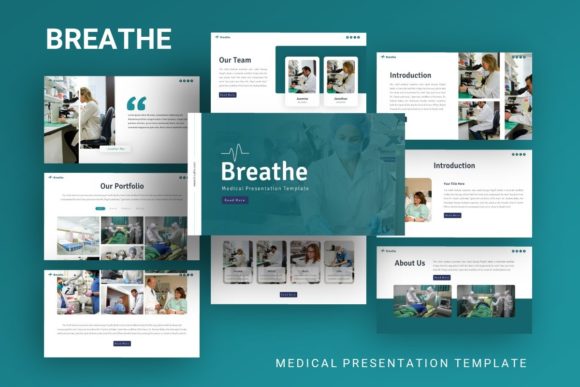
Presentation Template - Breathe: Design for Any Audience
Visual communication often fails not because the ideas are weak, but because the design creates friction between the speaker and the listener. Presentation Template - Breathe addresses this specific challenge by offering a clean, structured aesthetic that prioritizes clarity over clutter. While originally highlighted as a medical presentation resource, its underlying architecture makes it a versatile tool for creative agencies, corporate profiles, startups, and personal portfolios. The template provides a foundational system rather than just a collection of pretty slides, allowing users to focus on narrative flow rather than pixel alignment.
Why Visual Clarity Matters Across Industries
The name "Breathe" suggests an intentional pause and a reduction of visual noise, which is relevant far beyond healthcare settings. Different professionals approach slide design with distinct pain points, and this template attempts to solve them through standardized master slides and handcrafted infographics.
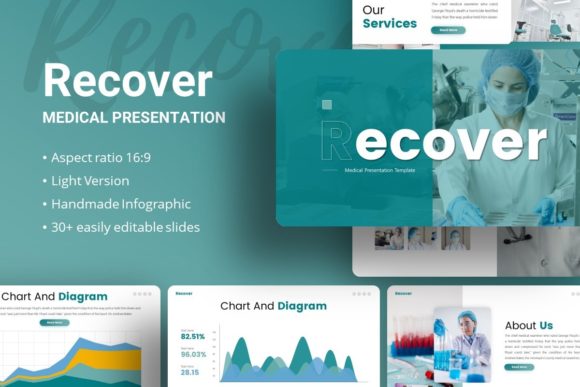
For medical professionals and researchers, accuracy and trust are paramount. A chaotic slide deck can inadvertently suggest disorganized data. In this context, the template’s pixel-perfect illustrations and resizable graphics serve a functional purpose: they present complex anatomical or statistical information without distracting embellishments. The ability to edit vector icons ensures that specific medical terminology is represented correctly, maintaining professional integrity during conferences or patient education sessions.
Conversely, creative agencies and freelancers evaluate presentation tools based on flexibility and brand adaptability. For these users, Presentation Template - Breathe acts as a modular grid system. Because the content is easily customizable and based on master slides, a designer can swap color palettes and typography in seconds to match a client’s brand guidelines. The 35 included slides provide enough variety to build a pitch deck or portfolio without feeling repetitive, while the drag-and-drop picture placeholders speed up the iteration process during tight deadlines.
Evaluating Features Based on User Experience Level
A template's value is subjective and depends heavily on the user's technical proficiency and available time. Understanding how different skill levels interact with the .PPTX file helps determine if it is the right fit for your current project.
Beginners and Non-Designers
If you have never opened PowerPoint before or feel intimidated by blank canvases, the primary priority is ease of use. Beginners should look at the documentation file included with the download. This resource bridges the gap between downloading the file and successfully editing it. The pre-designed infographic slides are particularly valuable here; instead of trying to draw a process flow from scratch, a beginner can simply replace text and icons. The learning value comes from reverse-engineering well-designed slides, helping new users understand hierarchy and spacing intuitively.
Experienced Professionals and Marketers
For those who already understand design principles, speed and reliability take precedence over tutorials. Experienced users will appreciate that the graphics are fully editable vectors rather than flattened images. This distinction is critical for commercial value. If a marketing manager needs to update a quarterly report template for a new fiscal year, they can modify the source elements directly without losing resolution or needing external software like Illustrator. The master slide structure ensures that global changes propagate instantly across all 35 slides, reducing formatting errors and saving hours of manual adjustment.
Practical Applications for Diverse Goals
The same set of files can yield vastly different outcomes depending on the intent. Here is how various audiences might leverage the specific features of Presentation Template - Breathe:
- Startup Founders: When pitching to investors, narrative pacing is everything. Founders can utilize the varied slide layouts to control the rhythm of the story, alternating between data-heavy infographic slides and minimalist image slides to maintain engagement. The professional polish signals competence, while the editable nature allows for last-minute pivot adjustments.
- Educators and Trainers: Teaching requires reusable assets. Educators can strip the template down to its core master slides to create a consistent lesson plan format. The handcrafted infographics help visualize abstract concepts for students, and because all elements are resizable, the same slide can be adapted for both large lecture hall projection and individual tablet viewing.
- Personal Portfolio Builders: Job seekers and hobbyists need to showcase personality alongside professionalism. The photography-focused slides allow high-quality work samples to take center stage. Since demo images are not included, users are forced to insert their own work, ensuring the final presentation is authentic rather than generic.
- Corporate Communications Teams: Internal consistency is a major challenge for large organizations. Teams can adopt this template as a sanctioned secondary option for departments that need more creativity than the standard corporate deck allows, but still require brand-safe structure. The vector icon set ensures visual language remains unified across different business units.
Assessing Quality and Long-Term Usefulness
Before committing to any digital asset, it is important to evaluate whether it offers sustainable value. With Presentation Template - Breathe, several factors contribute to its long-term utility.
Scalability of Assets: The fact that all graphics are resizable and editable means the template does not become obsolete when screen aspect ratios change or when print materials are needed. Vector-based elements ensure crisp output whether projected on a 4K monitor or printed in a handout.
Content Agnostic Design: While marketed with medical imagery in mind, the layout logic is neutral. This neutrality is what makes it suitable for a photography portfolio one month and a business pitch the next. Users should verify that the placeholder structures accommodate their specific content types; for example, photographers should check that image crops do not distort vertical compositions.
File Integrity: The inclusion of a dedicated documentation file indicates a level of creator support that free templates often lack. For business users, this reduces risk. Knowing there is a reference guide for troubleshooting master slide issues adds a layer of reliability that justifies the investment over ad-hoc free downloads.
Making the Right Choice for Your Project
Determining if this template aligns with your needs requires honest self-assessment regarding your workflow. Ask yourself the following questions:
- Do I need a complete redesign or a structural foundation? If you want a unique, avant-garde art piece, a template may feel restrictive. If you need a reliable, professional container for information, this fits.
- Is my content ready? Remember that preview images are not included. The template provides the frame, not the picture. It works best for users who already have text, data, or photos prepared and need a cohesive way to display them.
- What is my timeline? If you have weeks to design, building from scratch offers total control. If you have days or hours, the 35 pre-built slides and master slide system provide necessary acceleration without sacrificing quality.
Ultimately, Presentation Template - Breathe serves as a bridge between raw content and polished communication. Whether you are explaining a surgical procedure, launching a startup, or displaying creative work, the goal remains the same: to make the audience forget the design and remember the message. By providing a clean, editable, and professionally structured environment, this template removes technical barriers, allowing creators and professionals alike to deliver their ideas with confidence and clarity.