Presentation Template - Recover: Integrating Design Assets into Professional Workflows
In the lifecycle of any professional project, the transition from raw data to a compelling narrative is often the most time-consuming phase. Whether you are preparing a quarterly business review, launching a creative agency pitch, or documenting a medical research initiative, the visual framework dictates how effectively your message lands. The Presentation Template - Recover serves as a structural asset designed to bridge this gap between content creation and visual delivery. Rather than viewing this template merely as a collection of slides, it is more practical to approach it as a modular design system that integrates directly into your existing planning, execution, and reporting workflows.
This resource is engineered for versatility across multiple disciplines. While the name suggests a focus on medical or recovery contexts, its architecture supports a much broader spectrum of applications including corporate profiles, startup pitch decks, photography portfolios, and personal branding. By understanding where this asset fits within your operational process, you can reduce production time while maintaining high standards of visual consistency and professional polish.
Strategic Application Across Project Phases
The utility of the Presentation Template - Recover extends beyond the final delivery moment. It functions as a catalyst during three distinct phases of project management: preparation, active development, and post-project analysis.
Pre-Project Planning and Scoping
Before a single word of copy is written, this template aids in structural planning. With 35 unique slides available, users can utilize the deck as a storyboard to outline their narrative arc. For entrepreneurs building a pitch deck, selecting specific slides for problem identification, market size, and financial projections forces a discipline of brevity and focus. Similarly, educators and trainers can map out learning modules by assigning specific slide layouts to different pedagogical goals. This pre-selection process acts as a scoping mechanism, helping teams identify exactly what data needs to be gathered before production begins.
Active Execution and Content Population
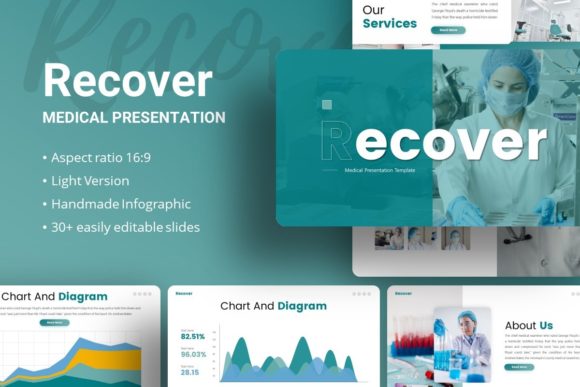
During the creation phase, the template’s Master Slide architecture becomes the primary efficiency driver. Instead of formatting individual elements on every page, changes made to the Master Slides propagate instantly across the entire deck. This is critical for agencies and corporate teams managing multiple stakeholders. If brand guidelines shift mid-project or if a client requests a global color adjustment, the task takes minutes rather than hours. The handcrafted infographics included in the package allow complex datasets to be visualized immediately, reducing the friction between having a statistic and showing it effectively.
Post-Project Reporting and Archiving
After a project concludes, the need to report outcomes remains. The Recover template facilitates retrospective analysis through its diverse layout options. Teams can repurpose the same asset used for the initial proposal to create a case study or portfolio piece. Because the graphics are fully resizable and editable vector elements, they retain quality regardless of whether the final output is a printed report, a digital PDF, or a projected presentation. This reusability transforms a one-time purchase into a long-term documentation standard.
Integration with Existing Tool Ecosystems
No presentation exists in a vacuum. The Presentation Template - Recover is designed to interact seamlessly with the software and assets professionals already use. Understanding these integration points prevents workflow bottlenecks.
- PowerPoint Compatibility: Provided as a .PPTX file, this template leverages native PowerPoint functionality. This ensures compatibility with Microsoft 365 cloud collaboration features, allowing teams to co-author documents without breaking the underlying master slide logic. It avoids the common pitfalls of third-party plugins that require all users to have specialized software installed.
- Asset Management: The inclusion of vector icons and editable illustrations means users do not need to subscribe to external icon libraries for basic visual needs. These assets integrate directly into the slide canvas, maintaining consistent stroke weights and styling with the rest of the deck.
- Image Workflow: The drag-and-drop picture placeholders connect directly to your local media library or stock photo subscriptions. This streamlines the process of swapping preview images for licensed or proprietary photography without disrupting alignment or masking.
- Documentation Alignment: The included documentation file serves as a technical manual, ensuring that new team members or freelancers can onboard quickly. This reduces the "tribal knowledge" dependency often associated with custom-designed templates.
Practical Implementation and Customization
To maximize the return on investment for this template, users should adopt a systematic approach to customization. The goal is to adapt the tool to your brand identity without compromising the structural integrity of the design.
Establishing Visual Consistency
Start by modifying the theme colors and fonts at the Master Slide level. This ensures that every new slide added adheres to your organization's visual standards. For medical or scientific presentations, this might mean utilizing clean blues and greens to convey trust and hygiene. For creative agencies, bolder contrasts and typography can be applied globally. The pixel-perfect nature of the illustrations means they will adapt to these color changes cleanly, provided the user utilizes the recolor tools within PowerPoint correctly.
Data Visualization Best Practices
The handcrafted infographics are a standout feature, but they require thoughtful implementation. Avoid using complex charts for simple data. Reserve the detailed infographic slides for key insights that drive decision-making. For secondary data, utilize simpler layouts to prevent cognitive overload. Because these graphics are vector-based, they can be ungrouped and modified to fit specific datasets, but users should exercise restraint to maintain the professional aesthetic intended by the designer.
Managing Media Assets
It is vital to remember that demo images are for preview purposes only. A practical workflow involves creating a dedicated folder structure for your presentation assets before opening the template. Organize your licensed photography, logos, and screenshots in advance. When you begin populating the Picture Placeholders, having organized assets prevents the disruption of searching for files mid-flow. This preparation step significantly accelerates the final assembly phase.
Quality Control and Usability Factors
Efficiency should never come at the cost of quality. When integrating Presentation Template - Recover into your routine, establish checkpoints to ensure the final output meets professional standards.
Resolution and Scaling: Always test the presentation on the target display hardware. While the template is pixel-perfect, projectors and screens vary. Verify that text remains legible and vector graphics remain crisp at full scale. The resizable nature of the elements allows for last-minute adjustments if testing reveals readability issues.
Content Hierarchy: Use the variety of the 35 slides to enforce information hierarchy. Do not feel compelled to use every slide. Select only those that serve the narrative. A concise 15-slide deck using this template is often more effective than a bloated 35-slide version. The template provides options, not mandates.
File Hygiene: As you edit, unused master layouts can accumulate. Periodically clean up the slide master view to remove unused layouts. This keeps the file size manageable and improves performance, especially when embedding high-resolution video or audio. A lean file is easier to share via email or cloud storage and less prone to corruption.
Adapting to Diverse User Needs
The flexibility of this template lies in its ability to serve different user personas without modification to the core file structure.
For medical professionals and researchers, the template offers a clean, sterile aesthetic that prioritizes clarity over decoration. The infographic capabilities are particularly useful for explaining patient journeys, treatment protocols, or clinical trial results. The structured layouts help in organizing dense technical information into digestible segments for conferences or stakeholder meetings.
For creative agencies and freelancers, the template acts as a portfolio scaffold. The emphasis on imagery and minimal text allows work samples to take center stage. The easy customization enables rapid tailoring for different client pitches, allowing creatives to spend more time on strategy and less time on slide design.
For startups and entrepreneurs, the pitch deck components provide a proven narrative structure. Investors expect certain information in a specific order. This template codifies those expectations visually, allowing founders to focus on refining their value proposition and financial modeling rather than debating font sizes.
Long-Term Value and Workflow Optimization
Integrating Presentation Template - Recover is an exercise in standardizing your communication output. Over time, this standardization yields compounding benefits. Team members become familiar with the layout logic, reducing the learning curve for future projects. Clients begin to associate the consistent visual quality with your brand reliability. The initial time invested in mastering the Master Slides and customization features pays dividends in every subsequent presentation created.
Ultimately, this template is a productivity tool disguised as a design asset. It removes the blank page anxiety and replaces it with a structured environment conducive to clear thinking and effective communication. By treating it as a integral component of your professional workflow—rather than an afterthought—you ensure that your ideas are presented with the precision and impact they deserve. Whether recovering from a complex project analysis or introducing a new venture, the right framework makes the difference between noise and signal.