Strato Presentation Template: Design for Impact
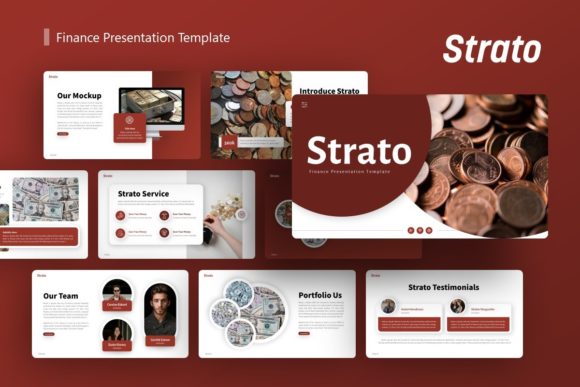
In the fast-paced world of digital communication, the difference between a forgettable meeting and a compelling narrative often lies in visual structure. The Presentation Template - Strato offers more than just a collection of slides; it provides a comprehensive design system built for clarity and impact. For professionals ranging from startup founders to creative directors, having a reliable foundation allows you to focus on refining your message rather than wrestling with alignment tools. Strato bridges the gap between high-end agency aesthetics and practical usability, ensuring that whether you are pitching to investors or showcasing a photography portfolio, your content remains the focal point.
A Foundation Built on Master Slides
The true power of the Strato template lies in its technical architecture. Many presentation templates fail because they rely on individual slide formatting, making global changes a tedious nightmare. Strato is engineered using Master Slides, which acts as the central nervous system of your deck. This means that when you adjust a color palette, update a font hierarchy, or reposition a logo, the change propagates instantly across all 36 slides. This feature is essential for maintaining brand consistency, especially when multiple team members are collaborating on a single file.
For marketers and business owners, this efficiency translates directly to time savings. Instead of spending hours fixing broken layouts after adding new content, you can trust the underlying grid. The pixel-perfect illustrations and resizable graphics ensure that your deck looks professional on any screen size, from a laptop in a coffee shop to a projector in a boardroom. Because all elements are vector-based or fully editable, you avoid the pixelation issues that often plague resized images, keeping your corporate profile or pitch deck sharp and credible.
Versatile Applications Across Industries
While many templates are niche-specific, Strato is designed with modularity in mind. Its neutral yet sophisticated aesthetic makes it adaptable for a wide spectrum of use cases. Understanding how to leverage this versatility is key to getting the most out of the asset.
Startup Pitch Decks and Investor Relations
When seeking funding, clarity is currency. Investors review hundreds of decks, and visual noise can obscure your value proposition. Strato’s handcrafted infographics are particularly useful here. Rather than pasting complex Excel charts, you can utilize the pre-designed data visualization slides to highlight market size, traction, and financial projections. These infographics are not static images; they are fully editable PowerPoint elements. You can adjust the data points and labels to reflect your specific metrics while retaining a polished, agency-quality look. This signals to stakeholders that you pay attention to detail and value professional presentation.
Creative Agency and Portfolio Showcases
For designers, photographers, and creative agencies, the template serves as a digital gallery. The picture placeholders are designed with drag-and-drop functionality, allowing you to swap preview images with your own work in seconds. However, the real advantage is the layout variety. Strato includes slides specifically structured for case studies, team introductions, and service breakdowns. A photographer might use the full-bleed image slides for emotional impact, while a branding agency might utilize the split-screen layouts to show before-and-after comparisons. The template supports visual storytelling without overpowering the art itself.
Corporate Profiles and Internal Reporting
Internal communications often suffer from "death by PowerPoint." Strato revitalizes standard reporting by offering clean, organized layouts for text-heavy content. The typography hierarchy guides the reader’s eye through executive summaries, quarterly goals, and operational updates. By using consistent iconography and spacing, you make dense information digestible. This is particularly valuable for HR departments presenting culture decks or operations teams outlining new workflows. The professional tone of Strato lends authority to internal documents, helping to align teams around shared objectives.
Customization Strategies for Authentic Branding
A common pitfall when using premium templates is leaving them looking too generic. To make Strato truly yours, you must move beyond simple text replacement. Treat the template as a starting point, not a final destination.
- Establish a Color Logic: Don't just apply your brand colors randomly. Assign specific meanings to your palette within the deck. Use your primary color for headers and key data points, and secondary colors for supporting elements. This creates a subconscious rhythm for the viewer.
- Curate Your Imagery: Remember that all images in the demo are for preview purposes only. The success of your presentation depends heavily on the quality of assets you insert. Ensure your photography style matches the clean lines of the Strato layout. If the template feels modern and minimal, avoid cluttered or low-resolution stock photos.
- Edit the Infographics: The included vector icons and charts are powerful, but they should reflect your specific industry. If you are in tech, swap generic gears for circuit or cloud motifs. If you are in sustainability, integrate organic shapes. Small contextual tweaks make the template feel bespoke.
- Refine Typography: While Strato comes with excellent font pairings, ensure they match your brand guidelines. If your company uses a specific typeface, replace the template fonts globally via the Master Slide view to maintain legal compliance and brand recognition.
Technical Considerations and Best Practices
To ensure a smooth workflow, familiarize yourself with the files included. The package contains the .PPTX file, a documentation guide, and vector icon sets. Reading the documentation first can prevent frustration, as it explains how to manipulate the master elements correctly. Always keep a backup of the original master file before beginning extensive customization. This gives you a safety net if you accidentally break a layout or need to revert to the base design.
When working with the resizable graphics, hold the Shift key while dragging corners to maintain aspect ratios. Distorted icons or stretched photos are the quickest way to undermine the professional appearance Strato provides. Additionally, while the template is optimized for standard widescreen formats, always test your presentation on the actual display equipment you will be using. Colors and contrast can shift between monitors and projectors, so a quick rehearsal ensures your pixel-perfect designs translate effectively in the real world.
Elevating Your Narrative Structure
Ultimately, a template is a vessel for ideas. Strato’s 36-slide count encourages comprehensive storytelling, but restraint is often more effective. You do not need to use every slide. Select the layouts that best support your narrative arc. If you are telling a story of growth, prioritize the timeline and chart slides. If you are introducing a new product, focus on the feature breakdown and hero image slides.
Consider the pacing of your presentation. Alternate between data-heavy infographic slides and cleaner, text-light visual slides to give your audience cognitive breathing room. Strato’s variety facilitates this rhythm naturally. By thoughtfully curating which slides to include and how to customize them, you transform a standard template into a strategic communication tool. The goal is to create a seamless experience where the design enhances understanding rather than distracting from it. Whether you are a freelancer building a personal brand or an educator creating course materials, Strato provides the structural integrity needed to deliver your message with confidence and precision.